Operating System
Nova OS
Compositor-first feel. Coherent system state. Immutable updates. Transparent app origins. Built for Nova devices.
Why Nova OS
Built like a product OS.
Nova OS is designed around four things you actually feel: responsiveness, coherence, reliability, and compatibility.
Feel
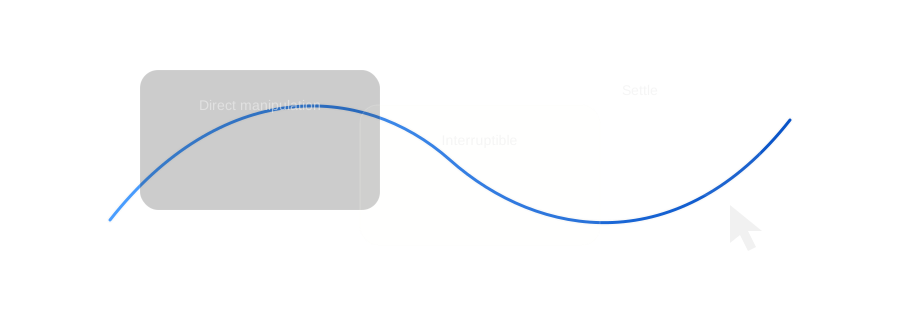
Compositor-first motion and direct manipulation — built to feel immediate.
Interruptible motionCoherence
One system brain owns truth, so surfaces don’t disagree.
`novad` state ownerReliability
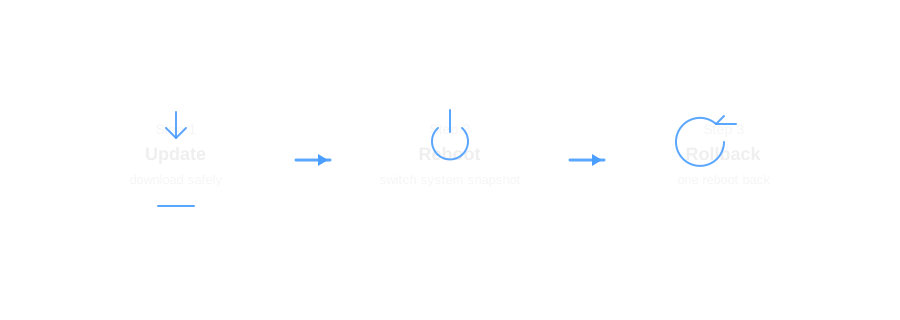
Immutable base with atomic updates you can roll back.
Update → reboot → rollbackCompatibility
Native apps, plus compatibility layers — clearly labeled.
Origin badgesFeel
Immediate under your hands.
Nova OS is built close to the compositor so input, motion, and rendering follow the same rules everywhere — not “per app.”
- Direct manipulation: surfaces track input, then settle naturally.
- Interruptible motion: change direction mid-gesture without waiting.
- One motion language across the shell: panels, overlays, workspace switching.
This is the difference between “feature-complete” and “premium.”
Coherence
One brain for system state.
Apps don’t fight over truth. Nova OS routes actions through a single state owner so toggles, permissions, and feedback stay consistent.
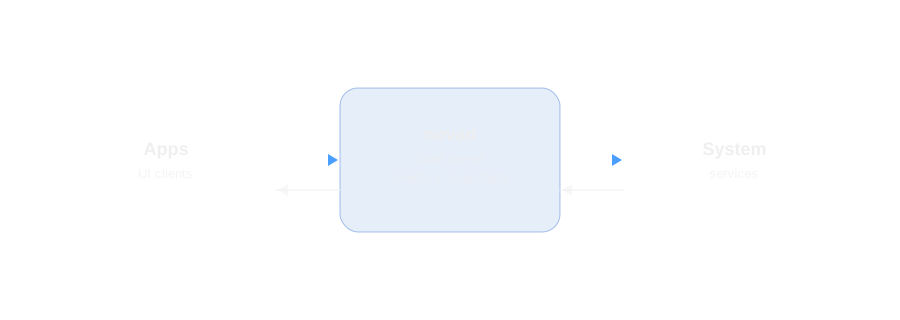
- A toggle is a toggle everywhere: one action model across surfaces.
- Permissions are consistent: one policy boundary for UI and system actions.
- State doesn’t desync: one owner publishes snapshots; clients render them.
For developers: UI speaks Nova; the system speaks Linux. That separation is deliberate.
Reliability
Updates you can trust.
Nova OS is built on an immutable foundation. Updates are applied atomically, and rollback is a first-class recovery path.
- Fewer “my system is cursed” states: the base OS stays consistent.
- Safer upgrades: update, reboot into a new snapshot, roll back if needed.
- Predictable delivery: a practical baseline for managed environments.
Designed in Abu Dhabi
Arabic-first by design.
Arabic is not an afterthought in Nova OS. RTL layout, typography, and regional conventions are part of the product definition.
RTL foundations
Layout uses logical properties so spacing, alignment, and navigation behave correctly in both directions.
Bilingual + regional
Bilingual UI, UAE-friendly formats, and regional conventions—built into the system experience.
Apps
Run what you need—clearly labeled.
Nova OS supports multiple app origins. The system makes it obvious what’s native and what’s running through a compatibility layer.
Full performance on Nova hardware
Apps built for ARM run without translation, integrating cleanly with system visuals and input behavior.
Best experience. Lowest overhead.
Legacy Linux apps
Run x86 Linux software through translation when needed, without changing your workflow.
Performance depends on the app and workload.
Mobile apps in a contained environment
Android apps run in a containerized environment and can appear alongside desktop apps.
Best for touch-first workflows and app catalog coverage.
Productivity via a background VM
Windows applications can be integrated through a managed VM approach for business and pro workflows.
This is a compatibility path—native apps remain the target.
Gaming compatibility when you want it
A Proton-based stack targets Windows game compatibility on Vulkan-capable hardware.
Game support varies by title and driver quality.
SwayUX
A material hierarchy you can recognize.
SwayUX is a system of surfaces across depth: digital canvas, paper, glass, and light. It’s how Nova OS stays visually coherent across apps and shell.
SwayFlat
The pure digital canvas: content-first, quiet, precise.
SwayPaper
Warm, tactile surfaces for docks, sheets, and primary controls.
SwayGlass
Translucent overlays for moments that need to float.
SwayLight
Soft luminance for focus, selection, and touch feedback.
Flat
Neutral digital surfaces for content. Minimal noise, minimal distraction.
Paper
Warm base, subtle grain, gentle edge highlights, and ultra-soft shadows—so controls feel tactile instead of sterile.
Adaptive UI
One OS, different postures.
Nova OS adapts density, controls, and navigation to input: desktop, tablet, or mobile.
Desktop
Windowed workflows, precise targets, and pointer-first interactions.
Tablet
Touch targets scale up; navigation becomes gesture-first when appropriate.
Mobile
Compact layouts and quick access surfaces designed for one-hand use.
Trust
Privacy you can see. Integrity you can verify.
Nova OS is designed to be legible to consumers and defensible for organizations—without burying people in jargon.
For people
Clear privacy indicators and consistent permissions make sensitive access visible and understandable.
- Camera/mic indicators
- Permission prompts with consistent language
- Privacy review surfaces designed for clarity
For organizations
An immutable base, full-disk encryption, and app sandboxing form a practical security baseline.
- Immutable OS foundation
- Full disk encryption
- Sandboxed apps and least-privilege access
Developers
Bring your SwiftUI apps.
NovaUI targets Swift teams first, with token-driven visuals and a clean system boundary for actions and state.
- SwiftUI-compatible goal: familiar patterns and mental model.
- Token-driven design system: one source of truth across apps and shell.
- Clear boundary: UI clients talk to `novad` for system actions.
// iOS
import SwiftUI

// Nova OS
import NovaUI  // SwiftUI-compatible goal

struct ContentView: View {
  var body: some View {
    VStack {
      Text(\"Hello, Nova\")
      Button(\"Get Started\") { }
    }
  }
}
Nova OS comes with Nova devices.
Explore Studio Pro to experience Nova OS on Nova hardware. If you need help or want to get involved early, we’re here.